A Humble AR Assistant
It started with a simple problem: expensive optical camera lucida tools and clunky tripods were getting in the way of learning to draw. We wondered if the incredible spatial awareness of modern devices like iOS and Apple Vision Pro could pin a reference image natively into our physical environment. The first commit was just a basic image tracker—a proof of concept to see if AR could replace physical tracing paper.
Beer Glasses and Desk Rigs
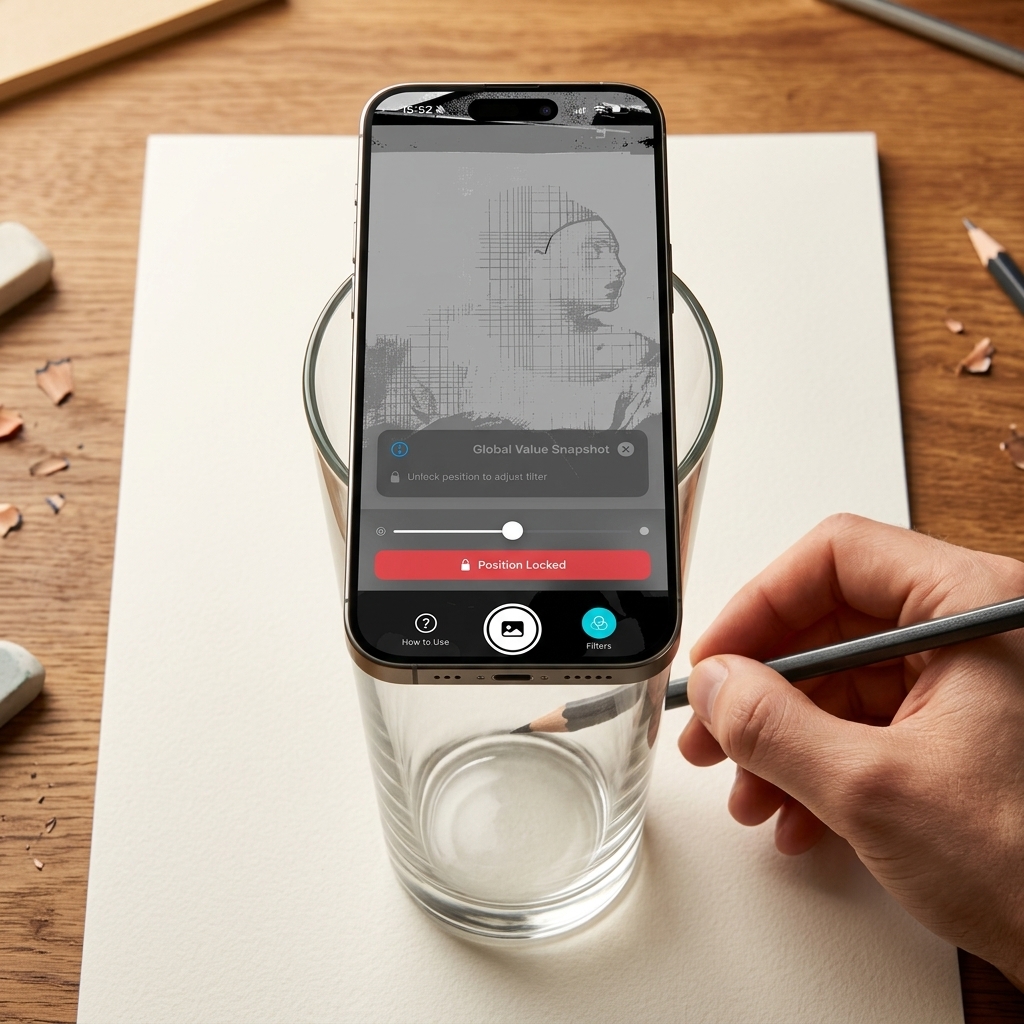
Software is only half the battle. We needed a way to hold the phone perfectly still over a sketchbook without spending money. We discovered the ultimate indie-dev solution: balancing the iPhone horizontally across a tall pint glass. The glass provides a perfectly stable, overhead stand that overlooks the sketchpad without getting in the way of your arms while drawing!
Value and Chiaroscuro
As we started using the app, we realized that drawing isn't just about tracing outlines—it's about understanding light. We dove into classical art theory and implemented the Global Value Snapshot and Monochrome filters. By mathematically breaking down the reference into its core values, we built tools to help us see the world the way the Old Masters did.
Color Harmony
Once we understood value, we tackled color. We built a mathematical Color Harmony engine that analyzes the RGB pixels of the reference image and extracts the dominant color palettes. This allows artists to visually isolate hue relationships and pre-mix their physical paints on their palette before ever touching the canvas.
Combating VIO Drift
We hit a major technical roadblock. During a 20-minute tracing session with the phone stationary on a glass, the image would slowly drift inches across the paper. ARKit's Visual Inertial Odometry (VIO) accumulates noise when staring at blank paper. To fix this, we invented the Hybrid Anchor Transplant.
Instead of relying on a static world anchor, when the user locks the image, we reverse-raycast to find the physical table (ARPlaneAnchor) and transplant the image tracking root. To prevent the image from snapping violently during the transfer, we explicitly solve the offset matrix:
let requiredLocalTransform = planeAnchor.transform.inverse * entityWorldTransform
entity.transform = Transform(matrix: requiredLocalTransform)
This completely eliminated the drift, providing absolute millimeter precision for tracing.
Contours, Mirrors & Foreshortening
With tracking locked down, we added powerful overlays to simulate historical optical phenomena. We integrated Canny edge detection to automatically generate contour lines for tracing. We also implemented Convex and Concave Mirror Distortion filters to simulate the exact optical distortions studied in the Hockney-Falco thesis, alongside 1, 2, and 3-point Radial Perspective Matrices.
visionOS and Beyond
We brought the app to Apple Vision Pro for true spatial immersion. Most recently, we spent time tearing out clunky UI paradigms (like the UIKit ARCoachingOverlayView and inline SwiftUI Menus) and replacing them with lightning-fast native Action Sheets to ensure the creative process is never interrupted by software lag.
Further Reading & Inspiration
Our journey building Camera Lucida was heavily inspired by the study of classical art, optics, and spatial computing. Here are a few key topics that guided our development:
- Hockney, David. Secret Knowledge: Rediscovering the Lost Techniques of the Old Masters. The seminal book proposing the Hockney-Falco thesis—that artists since the Renaissance used optical aids like the camera lucida and camera obscura to achieve unprecedented realism. This thesis was the direct inspiration for building an AR camera lucida.
- Chiaroscuro: The use of strong contrasts between light and dark to achieve a sense of volume in modeling three-dimensional objects.
- Canny Edge Detector: A multi-stage algorithm used to detect a wide range of edges in images, critical for our contour mapping.
- Visual Inertial Odometry (VIO): The core technology behind ARKit that estimates the 3D pose of the device using camera and IMU data.
Development Resources
Building this application required deep dives into Apple's spatial computing frameworks and the Swift language. Here are the primary resources we relied on:
- Apple Developer Documentation (ARKit & RealityKit): The absolute source of truth for understanding
ARPlaneAnchor, raycasting, and RealityKit's Entity-Component system. - WWDC Sessions: Specifically, sessions covering "Building Apps for visionOS", "Advances in ARKit", and "Explore Core Image".
- Hacking with Swift (by Paul Hudson): An invaluable resource for navigating the idiosyncrasies of SwiftUI state management and view hierarchies.
- Swift Forums & Stack Overflow: For diagnosing obscure
_UIReparentingViewbugs and wrestling withUIViewRepresentablelife cycles.